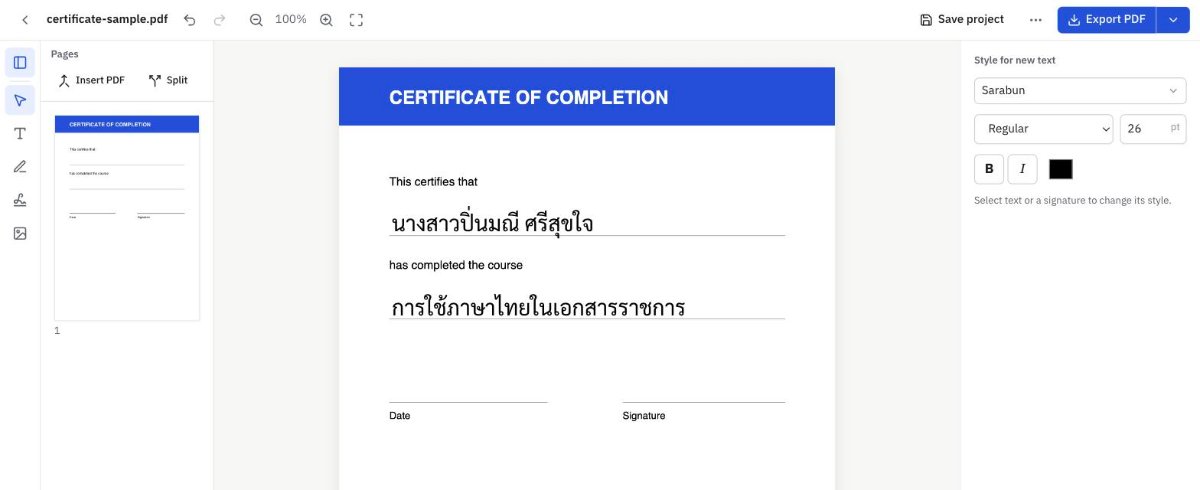
Edit Thai PDFs — with tone marks exactly where they belong
Change existing text, add text, sign, and export PDFs whose Thai stays searchable and copyable. No floating vowels, no stacked tone marks.
3 free exports a month — no card needed
Why Thai PDF
Thai done right
Every line is shaped with HarfBuzz: tone marks and vowels sit where they should, on screen and in the exported file.
Real text replacement
The old text is removed from the file, not just covered, so it can't be searched or copied. Everything else stays in place.
Passwords and permissions
Open protected files, export with the same password, or unlock them when you're authorized to.
Every PDF tool in one place
Edit text
Add text or change existing text, with correctly shaped Thai.
Sign
Draw, type or import a signature and place it.
Unlock PDF
Remove passwords and restrictions when you're authorized to.
Merge PDFs
Add the pages of other PDFs and arrange them.
Split PDF
Break into several files by page range.
PDF → images
Export pages as JPG or PNG.
Images → PDF
Combine JPG/PNG images into one PDF.
Government documents
Official Thai letters in the standard format, with the Garuda emblem.
PDF form template
The PDF is stored privately with the template. To use it, choose it, fill in the fields, and it opens in the editor ready to sign and export.
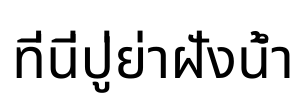
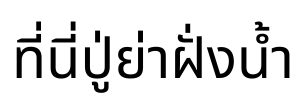
Floating vowels, stacked tone marks? Not anymore.
Most tools place Thai characters one after another, so tone marks float or collide with vowels. Thai PDF positions every mark with the font's own Thai rules.
Three steps
- 1
Open a PDF
Drop a file, or start from a template or a government document.
- 2
Edit or fill in
Change text, add text, sign, arrange pages.
- 3
Export
Download a PDF whose Thai text is searchable and copyable.
Simple pricing
Start free, upgrade when you need to, cancel anytime.
Pro monthly
- Unlimited exports
- PDF ↔ JPG/PNG
- Split and merge
- 10 projects
- 10 form templates
- 300 MB storage
Pro yearly
Save ฿189 a year compared with monthly (about ฿33/month) Yearly can be paid with PromptPay (one year, doesn't renew automatically).
- Unlimited exports
- PDF ↔ JPG/PNG
- Split and merge
- 10 projects
- 10 form templates
- 300 MB storage
Cancel anytime in Manage subscription; you keep Pro until the end of the paid period. Prices include tax.
Frequently asked questions
Are my files safe?
Files you edit are processed and not kept, unless you save them as a project or template — then they're stored privately in your account only. Administrators don't open your files.
What counts as an export?
Each result file you download: exporting a PDF, extracting pages, saving an unlocked copy or creating a government document. Failed exports don't count.
How do I cancel Pro?
Go to Subscription → Manage subscription. Cancel right away and keep Pro until the end of the period you paid for.
Can I pay with PromptPay?
Yes, for the yearly plan: one payment for one year, with no automatic renewal.
Which fonts can I use?
More than 30 openly licensed Thai and English fonts, such as TH Sarabun New, Sarabun, Anuphan, Noto Sans Thai and Kanit.
Can I edit a digitally signed PDF?
Yes, but any change invalidates the existing digital signature. Official documents should be corrected and reissued by whoever issued them.